 VoxCaption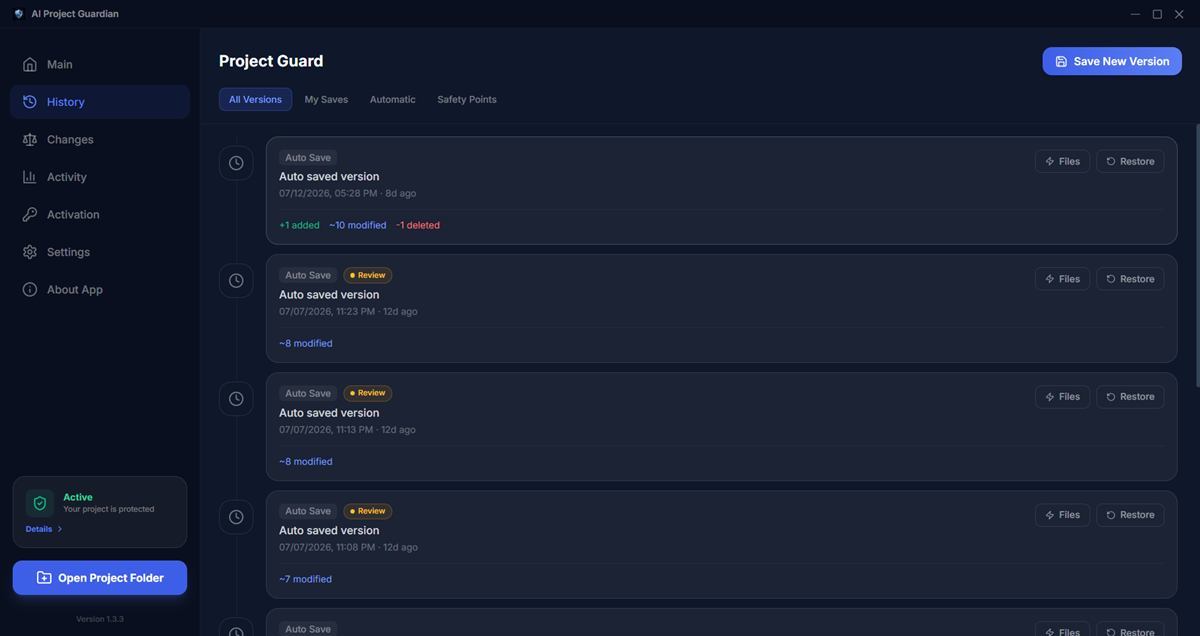
Git assumes a careful human is driving
Git's whole model — meaningful commits, reviewed diffs, deliberate history — assumes the person making changes understands them. An AI agent inverts every one of those assumptions:
- It commits over your history. Agents like Claude Code commit as they work, often with generic messages. Your clean checkpoint from this morning is now buried under fifteen "update files" commits you didn't write.
- It mixes good and bad changes in one commit. The agent fixes your bug and quietly rewrites a helper function in the same commit. Reverting the commit throws away the fix you wanted.
- Damage surfaces sessions later. You notice the broken feature three days after the edit, with new work layered on top.
git revertnow means untangling conflicts across a dozen commits. - Agents can run git itself. An agent with terminal access can
reset,rebase, force-push, orcheckoutover uncommitted work. Rare — but when it happens, git history itself is what got damaged. - Uncommitted work has zero protection. Agents edit fast and wide. The window between commits is exactly when the most files are in flight — and git protects none of it.
The reflog myth
git reflog can genuinely save you — it records every state HEAD pointed to, even after a hard reset. But try using it after an agent session: you're staring at forty entries with near-identical messages, guessing which hash was "before the damage." Reflog also can't recover untracked files, expires old entries, and lives inside .git — the same directory an agent can modify. A recovery mechanism the agent can touch isn't a recovery mechanism; it's a suggestion.
What a real safety layer looks like
To actually protect a project during AI-assisted coding, the recovery layer needs four properties git doesn't provide:
- Automatic. Snapshots happen on a timer and on file changes — not when a human (or agent) remembers to commit.
- Outside the agent's reach. Stored in a separate, encrypted location the AI never touches — so no command it runs can rewrite your recovery points.
- Whole-project and per-file. Restore one file the agent ruined without losing the four files it improved.
- Labeled by outcome. Mark versions Working or Broken as you test, so "last good state" is a fact, not an archaeology project.
This is exactly the design of AI Project Guardian: it watches your project while you code with any AI tool, takes AES-256-GCM encrypted snapshots outside your git history, shows a visual diff between any two versions, and restores a file or the whole project in about a second. Everything stays on your own disk — no cloud, no account.
The layered workflow that works
- Git for history you author — meaningful commits at real milestones, pushed to a remote.
- Automatic snapshots for everything between — every 5 minutes and before every risky agent task.
- Test and label after each agent turn — thirty seconds of marking Working/Broken saves hours of reflog spelunking.
- Restore surgically — pull back just the damaged file, keep the agent's good work.
FAQ
Doesn't this duplicate what git already stores?
No — snapshots cover the gaps git leaves: uncommitted work, untracked files, and states buried by agent commits. With deduplication and automatic ignoring of node_modules/dist/build, disk usage stays small.
Will it conflict with my git repo?
No. Snapshots live in a private storage area outside the project folder and never touch .git. Your repo, branches and remotes work exactly as before.
Add the missing safety layer
AI Project Guardian — automatic encrypted snapshots, visual diffs and one-second rollback for AI-assisted coding. 14-day free trial, no credit card.
Related Articles
Further reading: learn more about Git (external).